AI video creation for SaaS explainers

Create SaaS Explainer Videos Without Starting from a Blank Page

Turn product ideas, scripts, and visual references into connected scenes with an AI workflow for storyboarding and video creation.

A look at the visual storytelling experience and the idea behind “Your vision, made visible.”

What Is a SaaS Explainer Video?

A SaaS explainer video uses concise scenes, narration, and visuals to help an audience understand a software product, its workflow, or a specific feature. A useful strategy starts with one clear viewer question, then organizes the answer into a simple story rather than a list of disconnected capabilities. Mootion supports text-to-story and storyboard-led video workflows, with options to use reference images, video, and audio as part of the creation process.

Examples and workflows

SaaS Explainer Video Examples to Learn From

These examples show different ways to communicate a product, a technical idea, or a process. They are useful references for choosing an explainer format and deciding how much detail a video needs.

Monitoring YouTube Mentions for Brand Growth

A 129-second educational example about tagged and untagged brand mentions and tracking options. It demonstrates how a product-focused explainer can frame a problem before walking through relevant tools.

Brand monitoring · 129 seconds
ARM Ethos-U55: A Product-Focused Explanation

This 237-second technical explainer introduces an embedded-system microNPU, edge AI, and efficiency considerations. Its focused subject matter offers a model for structuring a detailed product explanation.

Technology explainer · 237 seconds

STM32U3: Explaining AI and Autonomous Power

A 225-second example describing low-power autonomous AI, TinyML, and embedded applications. Its source description includes concrete specifications—640 KB RAM and 2 MB Flash—that can anchor a technical story in product facts.

Technical product video · 225 seconds

Bringing Code to Life: Educational Robot in Action

In 84 seconds, this demonstration connects programming instructions, sensors, and student interaction to a robot’s movement. It is a compact example of showing a process through visible action.

Product demonstration · 84 seconds

Short-Form Promotion: Instant Mode Launch

This launch promo presents a prompt-led way to make short-form video and calls out Smart Reference, Seedance 2.5, MiniMax H3, and prompt optimization. It offers a reference for a concise feature-led promotional format.

Short-form product promotion

Director Mode: Showing Creative Control

This product demonstration features custom character uploads, scene reference images, and reference video for motion. It shows how a video can make a multi-step creative workflow easier to understand visually.

Workflow demonstration

For a SaaS audience, keep the story anchored in a real user need: explain the challenge, show how the product fits into the workflow, and make the intended outcome easy to follow. Explore related formats such as SaaS product explainer videos, a structured AI video storyboard, and clear technology explainers.

A practical video strategy

What You Get from a More Structured Workflow

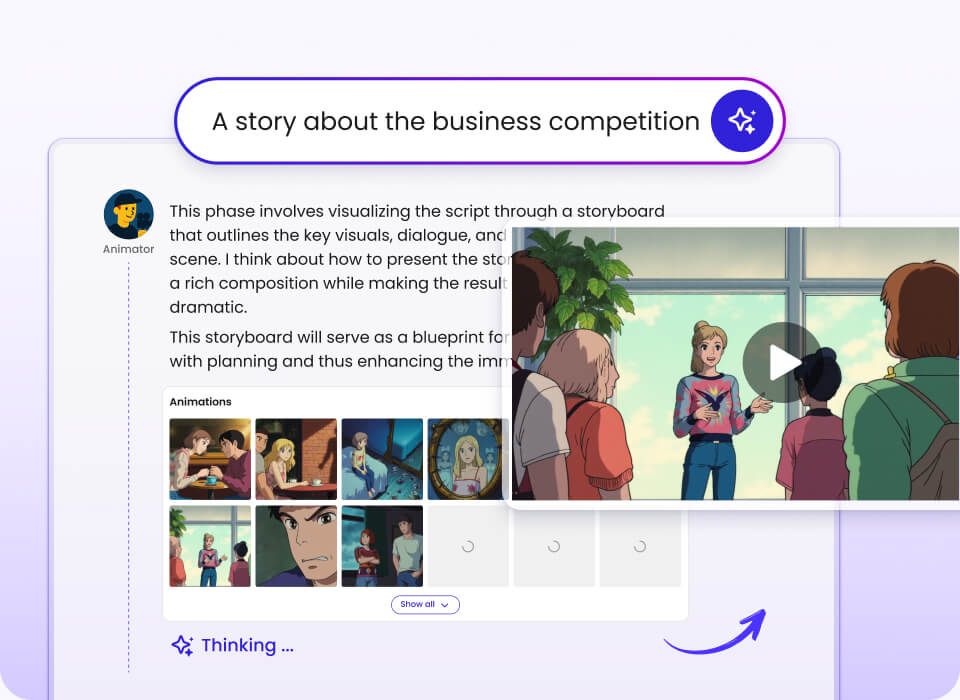
Plan the explanation around a viewer’s question, choose a creation mode that matches the level of control you need, and use references to guide the visual direction.

Illustrated video workspace with a presenter and storyboard scene thumbnails

Clarify the product story

Turn a prompt or script into a sequence of scenes that communicates one connected idea.

Choose an appropriate level of control

Use Instant Mode for short, prompt-led videos or Director Mode when you want a storyboard and shot-by-shot control.

Guide scenes with references

Bring images, video, or audio as multimodal references to help guide the visual direction.

Prepare for different audiences

Use the listed output-language options when creating explainers for audiences beyond one language.

Make technical ideas visible

Use individual scenes and demonstrations to break a complex product or process into understandable moments.

Take assets into your next step

Download video outputs and, where needed, story assets such as scripts, images, and clips for third-party editing.

For planning references, consider multimodal video references, a focused product demo scene, or a short-form product video.

How It Works

Choose a starting point, shape the story, then create and refine the scenes for the intended use.

Step 1

Start with an idea or input

Begin with a prompt, script, or supported visual and audio references.

What you see: a starting point for the story.

Step 2

Choose the workflow

Use Instant Mode for a prompt-led short video, or Director Mode for storyboard and shot control.

What you see: a workflow matched to your level of direction.

Step 3

Generate and refine

Create reference images and clips, review the sequence, and download the video or available story assets.

What you see: scenes and a video ready for your next step.

A useful foundation is a video script-to-scene workflow; for learning content, an educational video story can offer another way to think about pacing and clarity.

Features for Explainer Video Creation

The workflow combines prompt-led generation with options for building a more directed sequence. The details below reflect the capabilities provided for this page.

Core workflow features

  • •Instant Mode for prompt-led short-form videos up to 30 seconds.
  • •Director Mode for storyboards and individual shot rendering.
  • •End-to-end text-to-story workflow.
  • •Character list, scenes, clips, and final composite workflow.
  • •Prompt optimization before generation.

Reliability & control

  • •Character reference image uploads in Director Mode.
  • •Scene reference images and reference video support.
  • •Smart Reference for image, video, and audio inputs.
  • •Character consistency and more precise storyboard and shot control.
  • •Video duration from 30 seconds to 10 minutes in the broader workflow.

Integrations & export

  • •Multimodal starting inputs include prompts, scripts, images, video, and audio.
  • •Download completed videos from the platform.
  • •Download scripts, images, and clips as a ZIP for third-party editing.
  • •Video model options include Seedance 2.0, Seedance 2.5, MiniMax H3, and MiniMax H3 Flash.
  • •Output-language options include Greek and Kazakh, which were added to the supported languages.

Make the story visible before you finalize it

Director Mode is organized around character references, scenes, clips, and a final composite. This storyboard-first structure can help teams direct the explanation instead of treating every scene as an isolated visual.

Director Mode interface showing a character list and story controls

Proof: Product Reach and Creator Feedback

  • The company reports more than 100 million videos created.
  • The company reports more than 5 million creators.
  • The platform reports coverage across 50+ countries.
  • Available product information lists 17 output languages.
  • Use-case examples include short-form promotions, product explainers, educational videos, and technical demonstrations.

“I discovered Mootion pure by chance just browsing online and it immediately stood out! It was exactly what I was looking for to make my lessons more interactive and engaging!”

Saadia, English teacher

Comparison: Mootion vs. Alternative Workflows

A factual comparison depends on the specific tools being considered. The available information describes Mootion’s workflows but does not provide feature details for generic alternatives, so those cells are left unclaimed.

Decision point Mootion Generic alternative A Generic alternative B
Starting workflow Instant Mode or storyboard-led Director Mode Not specified in the available information Not specified in the available information
Reference inputs Images, video, and audio can be used as references Not specified in the available information Not specified in the available information
Duration details Instant Mode up to 30 seconds; broader workflow 30 seconds to 10 minutes Not specified in the available information Not specified in the available information
Exported materials Videos and story assets such as scripts, images, and clips Not specified in the available information Not specified in the available information

Credentials & Key Stats

These company-reported figures provide context for the scale of the platform.

100M+

videos created

5M+

creators

50+

countries covered

17

output languages listed

Pricing information: listed monthly tiers are Standard at $15, Plus at $25, Pro at $50, and Max at $200. Mootion does not offer a free plan; check the pricing page for current plan details.

View pricing

FAQs About SaaS Explainer Video Strategy

What is a SaaS explainer video strategy?+

A SaaS explainer video strategy is a plan for communicating a software product through a clear, visual story. It identifies the audience’s question, the main idea the video should explain, and the scenes needed to make that idea understandable. The format may be a short promotional clip, a product demonstration, or a more detailed technical explainer.

Can Mootion work for SaaS product explainers?+

Mootion turns prompts and other inputs into videos and animated scenes, and its examples include product promotions and technical explainers. Instant Mode is intended for prompt-led short-form videos, while Director Mode provides storyboard and shot control. The right approach depends on whether you need a quick concept video or more deliberate scene direction.

How do I start making an explainer video?+

Start with the product idea, script, or other input you want the video to explain. Choose Instant Mode for a short prompt-led video or Director Mode when you want to plan a storyboard and control individual shots. You can then use supported references, generate scenes and clips, review the result, and download the available output.

What inputs and video durations are supported?+

The described workflow accepts prompts and supports multimodal references such as images, video, and audio. Instant Mode supports videos up to 30 seconds. The broader workflow lists durations from 30 seconds to 10 minutes, with the available options depending on the chosen workflow and settings.

Can I export a video and edit it elsewhere?+

Videos can be downloaded from the platform. The available product information also describes downloading story materials—including scripts, images, and video clips—as a ZIP for third-party editing and compositing. This gives you an option to continue working on the materials outside the platform.

Is there a free plan, and what does Mootion cost?+

Mootion does not offer a free plan. The supplied monthly pricing details list Standard at $15, Plus at $25, Pro at $50, and Max at $200. Check the official pricing page for the latest plan limits, billing options, and included features before subscribing.

What should I know about security and support before signing up?+

The information on this page does not specify security controls, data-retention details, or support response times. Review the company’s privacy policy and terms for the published information about data handling and service terms. For questions about a plan or account, use the official product and pricing pages to find current guidance.

Make your SaaS story easier to see and understand.

Choose a starting point, shape the scenes, and create an explainer video workflow around your product story.